Hello Billiard Open the app

Carom coach · Four-ball · Three-cushion

Snap the table,
see the shot

Take a photo of the table. Hello Billiard finds the balls, runs a physics simulation and shows the scoring paths that fit your level, each with a success rate.

  • Works in the browser, no install
  • Photos never leave your device
  • No ads
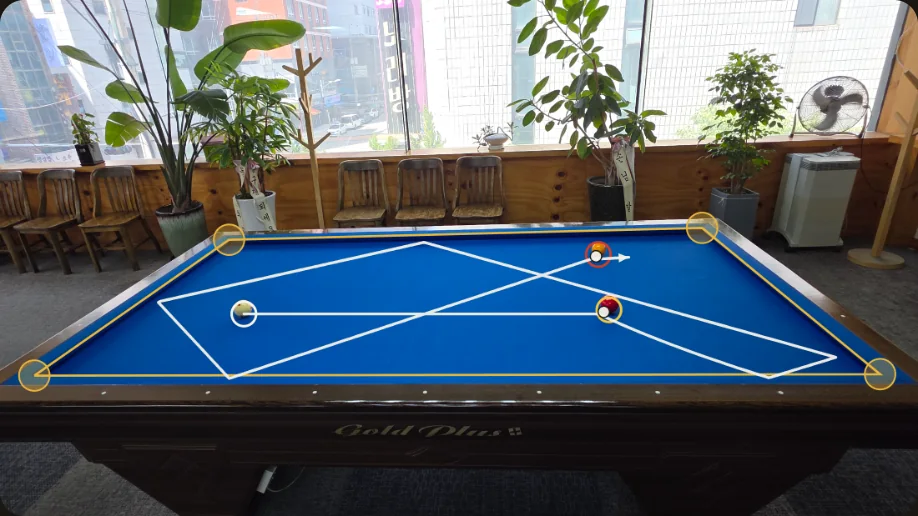
Photo of a real blue carom table with three detected balls and the calculated three-cushion path drawn over it
A real table photo: balls detected and the path drawn back onto the photo in perspective.
01 · Features

The table shows you
where to aim

Hello Billiard is a carom training tool that finds the shots you can make from any layout. It covers four-ball and three-cushion, plus game modes to play against friends.

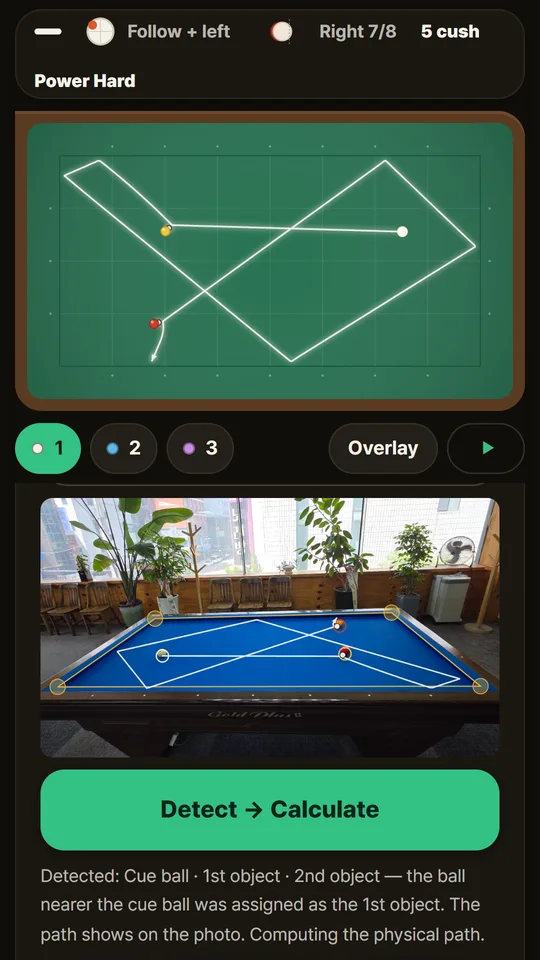
Photo recognition screen: a three-cushion path on the table diagram, and the same path over the real photo
Photo recognition

Take a photo, the balls are placed for you

It finds the table corners, corrects the perspective and tells the cue ball from the object balls by color. Once recognized, the paths are calculated and drawn over the photo too.

  • Corrects the parallax between cushion height and ball height
  • Tells white from yellow even under warm lighting
  • Photos are processed on your device and never uploaded
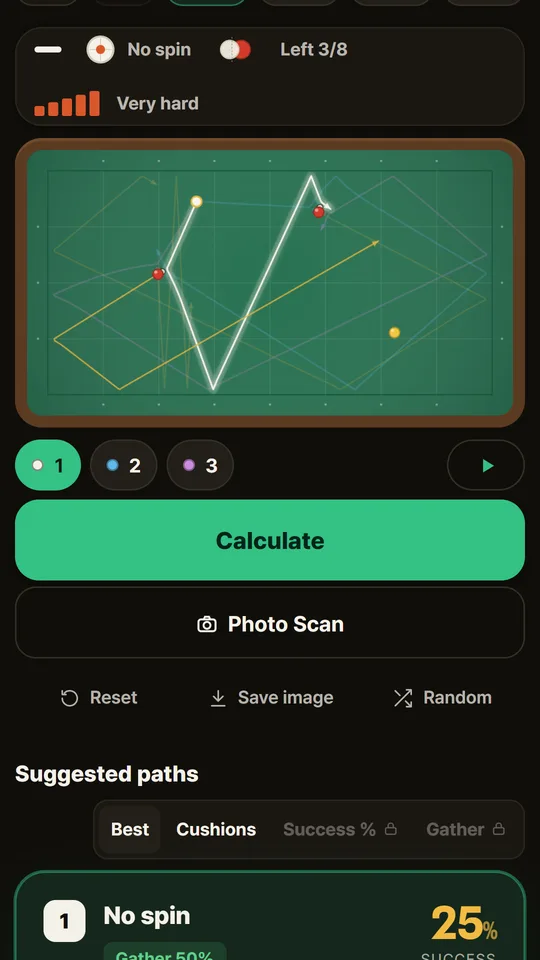
Four-ball path screen with the cue ball path on the table and a suggested-path card with its success rate
Four-ball

Only the shots you can actually make

It combines stun, draw, follow and side spin to find scoring paths, then picks up to five that differ in direction and style.

  • Beginner, intermediate, advanced: beginners never get extreme spin or ultra-thin hits
  • Success rate = the share of 90 simulated attempts that score, with level-based aim, speed and tip errors
  • Thickness, tip position, cushions and power for every shot, with ▶ playback
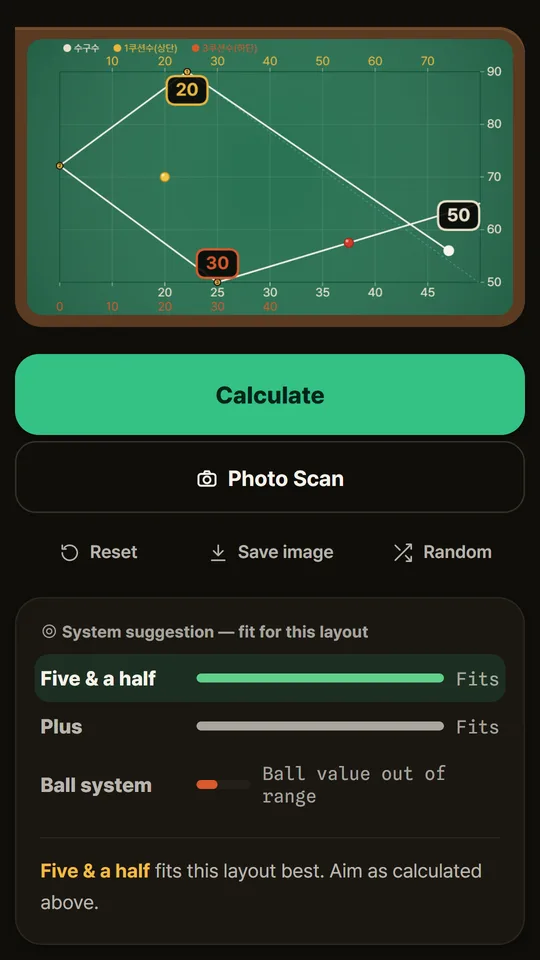
Three-cushion system screen with system numbers 20, 30 and 50 on the rails and a recommendation for Five & Half
Three-cushion

System numbers right on the rails

It calculates the Five & Half, Plus and Ball systems, marks the cue ball number and cushion points on the actual rail positions, and tells you which system fits the layout.

  • Layouts no system covers fall back to a physics search
  • Standard routes like around-the-table and reverse shots come first
  • Three spin levels: light, standard, heavy
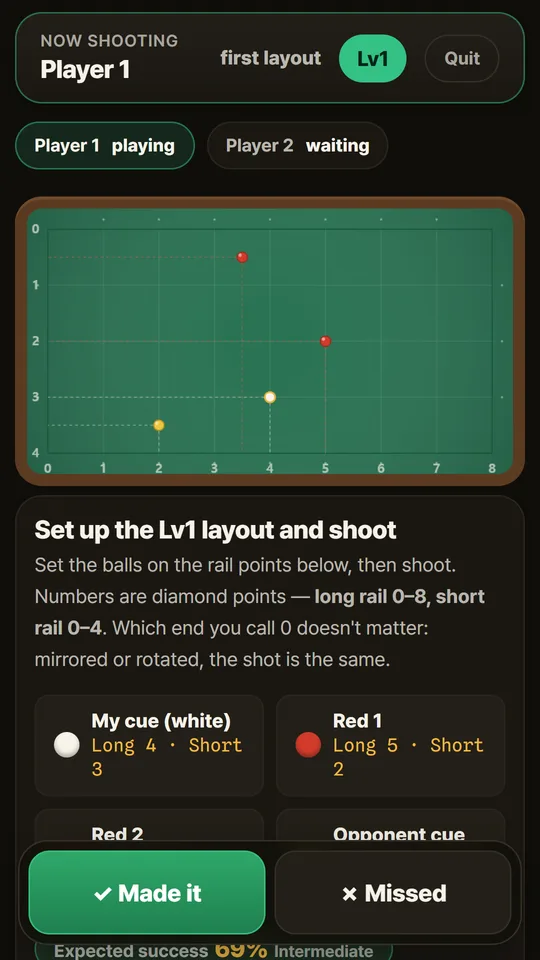
Game mode screen with a level-1 layout given in diamond coordinates and success / miss buttons
Games

Same difficulty, different layouts

Each player climbs a difficulty ladder until they miss, and the longest streak wins. Everyone gets a different layout so nobody can copy the last shot, but the difficulty is matched by success rate.

  • 10 levels for four-ball, 8 for three-cushion
  • Layouts are given in diamond coordinates, so you can set them up on a real table
  • Handicap match · score race · daily layout · weak-spot drills · lifetime record
Table calibrationSave cushion rebound and ball roll for your own table
Works offlineAdd to home screen and it calculates without internet
Save as imageExport the table with the path drawn on it
English · 한국어Switch languages in the app
02 · How it works

Five steps is all it takes

A sample layout is ready the first time you open it, so one tap shows you a result.

  1. Open the app and tell it your level

    Open hellobilliard.studioroomkr.com in your phone's browser. It asks for your four-ball and three-cushion level and sets your skill (beginner, intermediate, advanced) and starting game level. Tap Add to Home Screen in the browser menu to install it like an app that also works offline.

  2. Pick a game

    Choose Four-ball, Three-cushion or Games from the tabs at the top.

  3. Place the balls, or take a photo

    Drag the balls on the table diagram, or tap Photo and shoot the real table. Line up the four yellow dots with the inner corners where the cushions meet the cloth. Any ball that was misplaced can be dragged into place on the diagram.

  4. Calculate and pick a card

    Tap calculate to get path cards. Tap a card to draw that path on the table and ▶ to watch the balls roll. Each card shows which ball to hit first, thickness, tip position, cushions and suggested power.

  5. Tune it to your table

    If the real ball rebounds shorter than predicted, tap − Shorter; if longer, tap + Longer. Adjust roll if balls travel less or more than shown. Settings are saved on the device for both games.

For better photo recognition

  • Get the whole table in frame, from as high as you can
  • Keep the table in the middle of the screen
  • Shoot where the lighting is even
  • Set your cue ball color (white/yellow) in settings

Starting a game

  • Pick four-ball or three-cushion in the Games tab
  • Set the balls on the real table using the diamond coordinates
  • After the shot, record Success or Miss
  • Stuck? A hint shows just the single best path
03 · Pricing

The basics are free

Unlock Pro only when you want more. It's a one-time purchase, not a subscription.

Free

No sign-up

  • Four-ball paths and success rates
  • Three-cushion systems · one main physics path
  • Photo recognition 3 times a day
  • Games · table calibration · offline

Pro

Everything in Free, plus

  • Unlimited photo recognition
  • Multiple and advanced three-cushion paths
  • No watermark on exported images

A 1-day pass (24 hours) and a lifetime unlock are available. Prices are shown on the Pro screen in the app and follow your store's checkout. See the Terms of Use for details.

04 · FAQ

Questions

Are the success rates real player statistics?

No. It's the share of 90 simulated attempts at the same shot that score, with realistic aim, speed and tip errors for your level. Use it to compare paths; real results depend on the table.

Are my photos stored on a server?

No. Photos are processed only on your device and never uploaded. See the privacy policy for details.

Photo recognition isn't working well.

Get the whole table in frame, in even lighting, shooting from above. Line up the four yellow dots with the inner corners where the cushions meet the cloth, not the wooden frame.

You can always drag balls into place on the diagram afterwards. If the cue balls can't be told apart (e.g. a set with two white balls), one is assigned and you're told which.

The real ball doesn't follow the calculated path.

Every table's cushions and cloth are different. In settings, table calibration lets you adjust cushion rebound (shorter/longer) and roll. It's saved on the device and used from the next calculation.

Do I need to install it?

No. It runs in the browser. Use "Add to Home Screen" in the browser menu for an icon, and calculations work without internet.

Prefer an app? Get it on the App Store or Google Play.

I bought Pro and changed phones.

On a device signed in with the same Apple ID (or Google account), tap Restore purchase on the Pro screen to unlock the lifetime pass again. The 1-day pass lasts 24 hours from purchase and can't be restored.

How do refunds work?

App Store purchases follow Apple's process (reportaproblem.apple.com) and Google Play purchases follow Google Play's. For anything else, email us below. Pro is removed once refunded.

Download

Keep it on your phone,
pull it out at the table

Get it on the App Store for iPhone and iPad, or Google Play for Android. The app and the web version have the same features.

No install needed: open it in your browser

05 · Contact

Stuck? Let us know

Email

contact@studioroomkr.com

Please include your device and OS version (e.g. iPhone 15 · iOS 18, Galaxy S24 · Android 15), the screen where it happened and a screenshot if you can. We reply within 3 business days.

Feature ideas and "my table plays differently" stories are welcome too.